Beginner's Guide
This guide walks you through testing-os from zero – what the system is, how it works, and how to add your first repo.
What is testing-os?
Section titled “What is testing-os?”testing-os is a centralized evidence system that proves each repo under the Dogfood Lab and mcp-tool-shop-org GitHub orgs was actually exercised as a real product. Rather than trusting that a tool was tested, testing-os collects structured JSON records from automated workflows, validates them against schemas and policies, and persists accepted evidence with a full audit trail.
The core question it answers: “Was this repo actually used the way a real user would use it, and can we prove it?”
Every repo starts at the strictest enforcement level (required), and weakening enforcement requires a documented reason (exempt additionally requires a review date).
Key Terminology
Section titled “Key Terminology”| Term | Meaning |
|---|---|
| Record | A JSON document proving a dogfood run happened. Source repos author submissions; the verifier produces persisted records. |
| Scenario | A YAML file in the source repo (dogfood/scenarios/*.yaml) defining what constitutes a real exercise – steps, preconditions, success criteria. |
| Policy | A YAML file in testing-os (policies/repos/<org>/<repo>.yaml) defining enforcement rules: which scenarios are required, freshness thresholds, allowed execution modes. |
| Surface | The product type being exercised. The 8 defined surfaces are: cli, desktop, web, api, mcp-server, npm-package, plugin, library. |
| Verdict | The outcome of a dogfood run. Four levels from most to least severe: fail, blocked, partial, pass. |
| Enforcement tier | How strictly a repo is governed: required (default, blocks on violation), warn-only (warns but does not block), or exempt (skipped entirely). |
| Provenance | Proof that a claimed workflow run actually happened. In production, confirmed via the GitHub Actions API. |
| Ingestion | The pipeline that receives a submission, runs it through the verifier, persists the result, and rebuilds indexes. |
This guide introduces three of the four status vocabularies you’ll meet — the ones a new operator encounters within the first day. The fourth (agent_run lifecycle) is internal swarm control-plane plumbing surfaced indirectly through swarm dispatch / swarm collect errors; see the State Machines reference for the full picture, including all four vocabularies and which three are governed by formal transition tables.
- Record classification (ingest layer): every persisted record carries
verification.statusofacceptedorrejected. Portfolio buckets layer on top of that:stale,unknown_freshness,missing. Index rebuild has its own per-record outcome buckets:accepted,rejected,corrupted,skipped. - Finding review (intelligence layer): every finding moves through
candidate → reviewed → accepted → (invalidated). This governs human review of derived lessons, not record persistence. - Wave classification (swarm layer): the dogfood-swarm classifier compares each wave’s findings against the prior wave and emits
new,recurring,fixed,unverified.unverifiedmeans the prior finding’s path was outside the current wave’s scope — the agent did not look, so we cannot claim it was fixed. Distinct from finding-reviewaccepted.
Architecture Overview
Section titled “Architecture Overview”testing-os follows a write-once, verify-centrally architecture:
- Source repos define scenarios and run dogfood workflows in their own CI.
- Source workflows build a structured submission JSON and dispatch it to testing-os via
repository_dispatch. - The ingestion pipeline receives the submission and passes it to the verifier.
- The verifier validates schema, checks provenance, evaluates policy, and computes the final verdict. It may confirm or downgrade the proposed verdict but never upgrades it.
- Accepted records are written atomically to
records/<org>/<repo>/YYYY/MM/DD/. - Rejected records land in
records/_rejected/with machine-readable rejection reasons. - Indexes are rebuilt after every write:
latest-by-repo.json(primary read model),failing.json, andstale.json.
Downstream consumers like shipcheck (Gate F) and repo-knowledge read the indexes – they never write to testing-os.
Installation and Setup
Section titled “Installation and Setup”testing-os is an npm workspaces monorepo with seven packages under @dogfood-lab/*. A single root npm ci installs everything.
# Clone the repogit clone https://github.com/dogfood-lab/testing-os.gitcd testing-os
# Install dependencies for every workspacenpm ci
To run the full test suite:
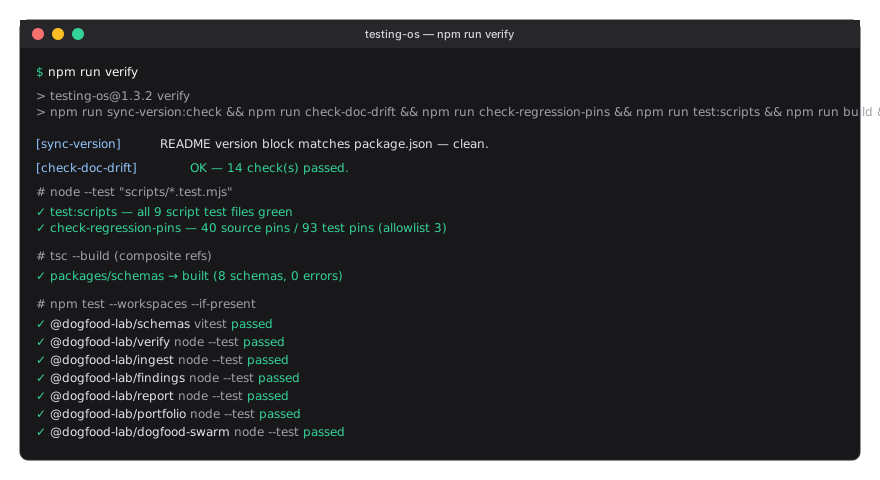
npm run verifyThis builds the TypeScript schemas package and runs the workspace-wide test suite (vitest for schemas, node --test for the JS packages).
A healthy run looks like this — green checkmarks across every workspace package and a clean exit:
Basic Usage
Section titled “Basic Usage”Running a local ingestion (test mode)
Section titled “Running a local ingestion (test mode)”You can test the ingestion pipeline locally using stub provenance (which skips GitHub API verification):
# Create a test submission (the report builder helps)node packages/report/build-submission.js \  --repo mcp-tool-shop-org/my-repo \  --commit abc1234567890 \  --workflow dogfood.yml \  --provider-run-id 12345 \  --run-url https://github.com/mcp-tool-shop-org/my-repo/actions/runs/12345 \  --scenario-file my-scenario-results.json \  --output submission.json
# Ingest the submission with stub provenancenode packages/ingest/run.js --file submission.json --provenance=stub
The --provenance=stub flag is only allowed outside CI. In GitHub Actions, provenance defaults to real GitHub API verification.
Generating the portfolio report
Section titled “Generating the portfolio report”node packages/portfolio/generate.jsThis reads the latest index and all repo policies to produce a summary of coverage, freshness, stale repos, and repos with policies but no records.
Checking indexes
Section titled “Checking indexes”The three generated indexes in indexes/ are the primary read interface:
latest-by-repo.json– latest accepted record per repo and surfacefailing.json– records where the verified verdict is notpassstale.json– repo/surface pairs exceeding the staleness threshold
Common Workflows
Section titled “Common Workflows”Adding a new repo to dogfood governance
Section titled “Adding a new repo to dogfood governance”- Create a policy file at
policies/repos/mcp-tool-shop-org/<repo>.yaml:
repo: mcp-tool-shop-org/<repo>policy_version: "1.0.0"
enforcement:  mode: required
surfaces: cli: # or desktop, web, api, mcp-server, npm-package, plugin, library required_scenarios: - my-scenario-id freshness: max_age_days: 14 warn_age_days: 7 execution_mode_policy: allowed: [bot] ci_requirements: coverage_min: null tests_must_pass: true evidence_requirements: required_kinds: [log] min_evidence_count: 1-
Create a scenario file in the source repo at
dogfood/scenarios/my-scenario-id.yamldefining the steps that constitute a real exercise of the product. -
Create a dogfood workflow in the source repo at
.github/workflows/dogfood.ymlthat:- Builds and runs the scenario
- Uses the submission builder to produce a canonical submission
- Dispatches the submission to testing-os via
repository_dispatch
-
Add the
DOGFOOD_TOKENsecret to the consumer repo (required — without it, dispatch silently skips).- Mint a fine-grained PAT (or GitHub App token) with
contents: writescoped todogfood-lab/testing-os(this is what the receiver workflow needs to commit records and indexes back tomain). - Add it under the consumer repo’s Settings → Secrets and variables → Actions as
DOGFOOD_TOKEN. - GitHub docs: Creating a fine-grained personal access token.
- Failure mode if missing: the consumer’s
dogfood.ymlruns successfully (green CI), but the dispatch step is skipped with aDOGFOOD_TOKEN not setwarning, no submission reaches testing-os, and no record ever appears inindexes/latest-by-repo.json. This is the most common silent-failure new contributors hit — see Troubleshooting below.
- Mint a fine-grained PAT (or GitHub App token) with
-
Run the workflow and verify the record appears in
indexes/latest-by-repo.json(allow 3-5 min forraw.githubusercontent.comCDN cache to refresh — the handbook itself is served via GitHub Pages, also CDN-backed, so handbook edits can take a few minutes to surface after deploy. See Operating Guide → CDN Cache Timing).
Investigating a failure
Section titled “Investigating a failure”When a submission is rejected:
Rejected records are committed back to the testing-os repo (not your local machine) by
ingest.yml. Browse them on GitHub atrecords/_rejected/, orgit clone https://github.com/dogfood-lab/testing-os && ls records/_rejected/to inspect locally.
- Check
records/_rejected/for the rejected record – theverification.rejection_reasonsarray lists every reason. - Common causes: schema validation failure, provenance not confirmed, policy violation, step verdict inconsistency. For a structured error code (e.g.
RECORD_SCHEMA_INVALID,DUPLICATE_RUN_ID), see the Error Code Reference. - Fix the issue in the source repo’s scenario or workflow, not in testing-os governance.
- Re-run the dogfood workflow.
Weekly freshness review
Section titled “Weekly freshness review”- Run
node packages/portfolio/generate.js - Open
reports/dogfood-portfolio.jsonand check thestalearray - Repos with
freshness_days > 14need attention; repos over 30 days are in violation - Re-run the source repo’s dogfood workflow or document the blocking reason
Troubleshooting
Section titled “Troubleshooting”| Symptom | Likely Cause | Fix |
|---|---|---|
Submission rejected with schema: errors |
Submission JSON does not match dogfood-record-submission.schema.json |
Run precheckSubmission() from the report builder to catch issues before dispatch |
Submission rejected with provenance: errors |
The claimed workflow run could not be confirmed via GitHub API | Ensure GITHUB_TOKEN has actions:read scope; verify the source.provider_run_id and source.run_url match a real run |
Submission rejected with submission-contains-verifier-field |
The submission includes fields that only the verifier may set (policy_version, verification, or overall_verdict as an object) |
Remove verifier-owned fields from the submission; use the submission builder to avoid this |
Verdict downgraded from pass to fail |
A required step failed, policy validation failed, or provenance was not confirmed | Check overall_verdict.downgrade_reasons in the persisted record for specifics |
| Gate F fails in shipcheck | The repo has no accepted record, the verdict is not pass, or the record is stale |
Re-run the dogfood workflow; check that the CDN cache has refreshed (3-5 minutes after ingestion) |
--provenance=stub rejected in CI |
Stub provenance is blocked when CI=true or GITHUB_ACTIONS=true |
Use --provenance=github in CI with a valid GITHUB_TOKEN |
Portfolio shows repo in missing array |
The repo has a policy file but no accepted record in the index | Run the dogfood workflow for that repo at least once |
Tests fail in npm run verify |
Workspace dependencies may be missing | Run npm ci at the repo root once — npm workspaces installs every package in a single pass |
Consumer workflow is green, but no record appears in indexes/latest-by-repo.json |
DOGFOOD_TOKEN secret is missing on the consumer repo — the dispatch step skipped with a DOGFOOD_TOKEN not set warning |
Add DOGFOOD_TOKEN (fine-grained PAT with contents: write on dogfood-lab/testing-os) under the consumer’s Settings → Secrets and variables → Actions |
Portfolio shows Unknown freshness: <n> and entries in unknown_freshness[] |
record.timing.finished_at was unparseable — computeFreshnessDays returned null and the entry was routed out of the stale bucket |
Inspect each unknown_freshness[].raw_finished_at, fix the source repo to emit a well-formed ISO 8601 timestamp, re-dispatch. Don’t ignore — these silently bypassed the freshness review |
[rebuild-indexes] corrupted record skipped: <path> in CI logs |
A persisted record file failed JSON.parse; the rebuild kept going and the record is excluded from indexes | Check the corrupted[] array returned by rebuild-indexes (or the stderr line) for { path, error }, open the file, fix or remove, then re-run node packages/ingest/rebuild-indexes.js |
CLI prints ERROR [<CODE>]: … with a Next: hint |
A typed error surfaced from ingest or dogfood-swarm | Look the code up in the Error Code Reference and follow the hint |